Configuration for docker containers
How to set environment variables?
We have to pass these values through parameter -e (e comes from environment variables). For each env variable comes a -e parameter
docker create -p27017:27017 --name mongodb -e MONGO_INITDB_ROOT_USERNAME=alan -e MONGO_INITDB_PASSWORD=password mongo
See more information about environment variables that your preferred database gets with the correspondent provider
🐋 Docker Files
Build our own container
Imagine that you build the next code
import express from 'express'
import mongoose from 'mongoose'

const Animal = mongoose.model('Animal', new mongoose.Schema({
  tipo: String,
  estado: String,
}))

const app = express()

mongoose.connect('mongodb://alan:password@localhost:27017/miapp?authSource=admin')

app.get('/', async (_req, res) => {
  console.log('listando... chanchitos...')
  const animales = await Animal.find();
  return res.send(animales)
})
app.get('/crear', async (_req, res) => {
  console.log('creando...')
  await Animal.create({ tipo: 'Chanchito', estado: 'Feliz' })
  return res.send('ok')
})

app.listen(3000, () => console.log('listening...'))
We will save this inside of a container to deploy easier.
What is a Docker File?
Docker files are files that let us build our own container from zero. It is useful in case that you want to share a project or code without other developers needs to install all required dependencies.
All images the images that we creates need to be based on another image, and this will be the first instruction of our image:
FROM node:latest
Then we have to follow the next steps:
FROM node:latest

# This makes our dir of work, this is inside of the Linux image of the container, not your real/physical (host) system
RUN mkdir -p /home/app

# Now, we have to say to Docker from where it will take the source code in our host machine. In this case, base on the path where Docker file is, we will set the path of our source code.

# Generally the Docker file is in the root of our source code, so insetad of set a full path, we just put a '.', representing that code is in the same path and in the same level that our docker file
COPY . /home/app

# Expose the port
EXPOSE 3000

CMD ["node", "/home/app/index.js"]
Before to make our container. We have to understand how to connect two containers in the same host.
Docker networks
How to create a container & how to create a network
Here we have the example, now we have the Mongodb Database, we have node environment. We just miss the connection between the two containers
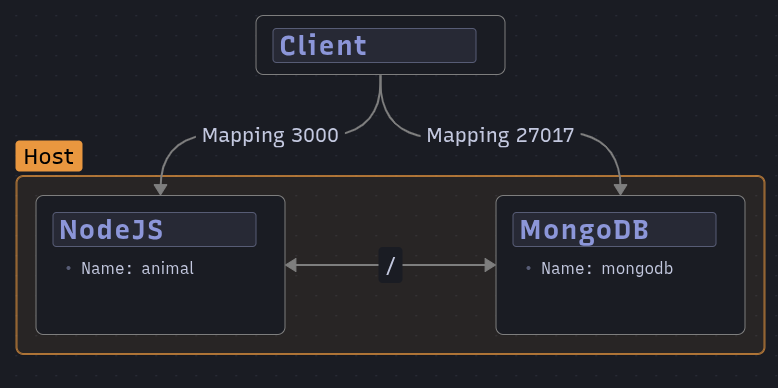
To connect two containers in Docker, we have to create a network
# First, we will list all networks that are currently existing in docker
docker network ls

# Once we know all networks in docker, we will create our network
# docker network create <name_of_network>
docker network create my_net

# If we want to remove that network
docker network rm my_net
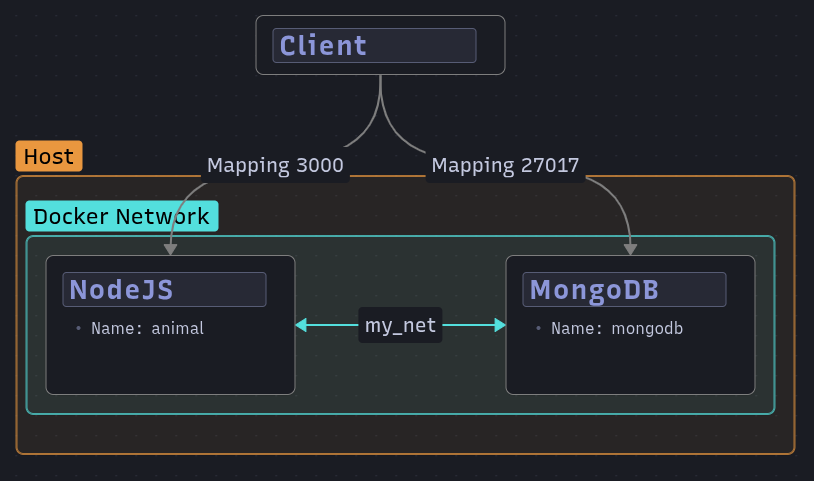
Once we know how to see, create and delete a network, we have to understand how it works in the source code:
// In this part we will change 'localhost' by the name of the mongodb container, what in this exmaple is 'mongon'

mongoose.connect('mongodb://alan:password@mongon:27017/miapp?authSource=admin')

// This is because the code already does not work with localhost directly. it will work inside of the network where it will find other containers in the same network
Now we must run docker build to build our container. This command gets a parameter -t that refers to the name and tag of this image:
# docker build -t your_app_name:your_tag_name ~/path/to/your/dockerfile
#----------------------------
docker build -t myapp:alpha .
To see if your image was created run docker images.
Set a network to a new container
To define a network to a container is necessary to do that in the creation stage. This means that you only can define a network to a container when you create that.
When we will be creating the container, we will use another parameter called --network followed by the name of the network that was created previously (mynet)
docker create -p27017:27017 --name mongon --network mynet -e MONGO_INITDB_ROOT_USERNAME=alan -e MONGO_INITDB_ROOT_PASSWORD=password mongo
And finally we create a container from our created image:
docker create -p3000:3000 --name myapp --network mynet myapp:alpha
Finally, we just can run each container, first database, and then the node container that we created
docker start mongon
docker start myapp